Huawei Router BE3 Pro (疾风版) Review: The $33 WiFi 7+ Router Taking JD by Storm
Huawei Router BE3 Pro 疾风版 has 200K+ reviews on JD.com with 98%+ positive rating at just ¥238.5 ($33). Users praise its WiFi 7+ acceleration, excellent compatibility with Huawei phones, and the smart antenna for stable coverage. The main criticism is the Gigabit-only Ethernet port (no 2.5G) on the base model. Conclusion: ✅ Worth Buying — the most affordable WiFi 7+ router for Huawei ecosystem users.
Huawei Router BE3 Pro (疾风版) Review: The $33 WiFi 7+ Router Taking JD by Storm
On JD.com, the Huawei Router BE3 Pro 疾风版 has accumulated 200,000+ reviews with a 98%+ positive rating — one of the highest approval rates in the entire router category. At just ¥238.5 (~$33 USD, after government subsidy), it ranks #8 on JD’s best-selling router chart with over 400,000 units sold. Users consistently praise its WiFi 7+ performance, Huawei ecosystem integration, and smart high-gain antenna for wall penetration. The recurring complaint is the all-Gigabit Ethernet port arrangement — no 2.5G port on the base model. Conclusion: ✅ Worth Buying — the most affordable real-world WiFi 7 experience for Huawei phone users.
Introduction
Huawei’s BE3 Pro 疾风版 (Swift Edition) represents the company’s push to democratize WiFi 7. While the WiFi 7 standard is still rolling out globally, Huawei has jumped ahead with its proprietary “WiFi 7+” technology — a chip-level optimization stack built on top of the IEEE 802.11be standard. The result is a router that promises faster speeds, lower latency, and better wall penetration than standard WiFi 6/6E routers, at a price that undercuts even many WiFi 6 rivals.
Available in three variants — the base 疾风版 (Gigabit), the 雷电版 (single 2.5G port), and the BE3 Pro+ (dual 2.5G ports) — the 疾风版 is the entry point. But don’t let “entry point” fool you: with 3600Mbps theoretical throughput, four high-gain external antennas, and deep integration with the Huawei Smart Life app, this is a fully capable home router for most households.
With 200,000+ reviews and a 98%+ positive rating on JD, the user consensus is clear. But does it deliver on its promises? Let’s dig into the specs, real user experiences, and competitive landscape.
Specifications and Variant Breakdown
The BE3 Pro series comes in three flavors. Understanding the differences is critical before buying:
| Feature | BE3 Pro 疾风版 (This Review) | BE3 Pro 雷电版 | BE3 Pro+ |
|---|---|---|---|
| Price (JD) | ¥238.5 ($33) | ¥379 ($52) | ¥459 ($64) |
| WiFi Standard | WiFi 7+, 3600Mbps | WiFi 7+, 3600Mbps | WiFi 7+, 3600Mbps |
| WAN Port | 1× Gigabit | 1× 2.5G | 1× 2.5G |
| LAN Ports | 3× Gigabit | 3× Gigabit | 3× Gigabit + 1× 2.5G |
| Antennas | 4× high-gain external | 4× high-gain external | 4× high-gain external |
| Smart Antenna | ✅ | ✅ | ✅ |
| WiFi 7+ Acceleration | ✅ | ✅ | ✅ |
| AI Life App | ✅ | ✅ | ✅ |
| Child Protection | ✅ | ✅ | ✅ |
| Processor | Huawei Quad-core | Huawei Quad-core | Huawei Quad-core |
The critical differentiator is Ethernet port speed. The 疾风版 is limited to Gigabit ports throughout, meaning your wired connections max out at ~940Mbps. If you have a fiber internet plan over 1Gbps, or if you run a NAS with 2.5G networking, the 雷电版 or BE3 Pro+ is the better choice. For the vast majority of homes on 500Mbps–1000Mbps broadband, the 疾风版’s Gigabit ports are not a bottleneck.
Design and Build
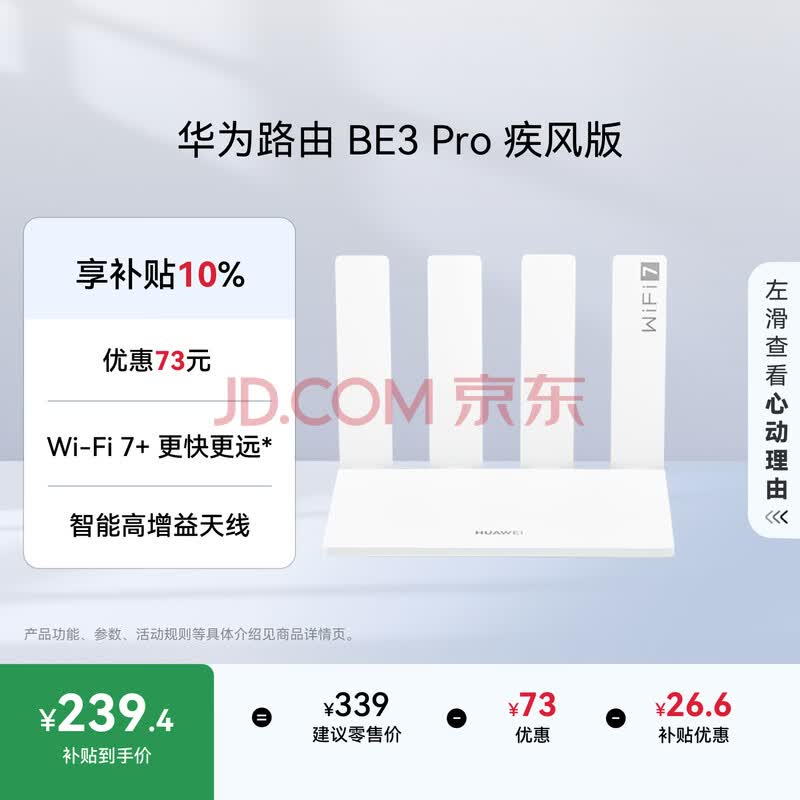
The BE3 Pro is a substantial device. As JD user A***u notes: “It’s honestly quite large, the antennas are huge too” — and they’re not wrong. The router measures approximately 210mm × 140mm × 40mm (body only), with four external high-gain antennas that extend to about 180mm each. The antennas are adjustable, allowing you to position them for optimal signal direction.
The build quality is typical Huawei: clean white matte plastic with subtle branding. The front panel has a minimalist design with a single status LED. Ventilation grilles run along the top and bottom for passive cooling. The base has mounting slots for wall installation.
The smart high-gain antenna system is the standout hardware feature. The antennas use an algorithm to dynamically adjust their signal pattern based on connected device locations, improving coverage in challenging layouts. It’s not just marketing — multiple JD reviews specifically call out the improved signal in multi-room apartments versus their previous routers.
“Huawei router, minimalist design, works great. Signal transmission speed is very fast, signal is very stable. Signal wall penetration is excellent.” — b*m, JD.com verified purchase**
“Honestly quite large, the antennas are huge too. Good for home setup, much easier than Kunlun. Works well for small offices, fast speeds.” — A*u, JD.com verified purchase**
WiFi 7+ Performance: What’s the Real Deal?
The “7+” in WiFi 7+ is crucial to understand. Standard WiFi 7 (802.11be) introduces features like Multi-Link Operation (MLO) and 320MHz channel bandwidth. Huawei’s WiFi 7+ adds two proprietary technologies on top:
-
Weak Signal Dual WiFi Acceleration: When your device has a weak connection, the router simultaneously uses both the 2.4GHz and 5GHz bands to maintain throughput — effectively bonding them for better coverage at range.
-
Dynamic Narrow Bandwidth Technology: Automatically reduces channel width in interference-heavy environments to maintain a stable connection rather than dropping out.
The catch? WiFi 7+ benefits are currently limited to Huawei devices running HarmonyOS — specifically the Pura 90 series, nova 14 Pro/Ultra, and compatible phones. With standard WiFi 7 clients (laptops, iPhones, most Android phones), the router operates as a standard WiFi 7 device with backward compatibility to WiFi 6 and 5.
In practical terms, this means:
- With a Huawei Pura 90/nova 14 series: Full WiFi 7+ acceleration — expect significantly better range and stability
- With other WiFi 7 devices (e.g., latest laptops): Standard WiFi 7 performance — still excellent, but no Huawei magic
- With WiFi 6 devices: Full backward compatibility at WiFi 6 speeds
JD reviews confirm strong real-world performance. The top review tags tell the story: “fast transmission” tagged 3,425 times, “stable signal” 2,509 times, and “strong signal” 2,560 times.
“JD delivery fast, good packaging. Huawei router quality is good, I used Huawei before so easy to switch. Simple to operate, already using it, WiFi 7+ is fast and stable.” — S*H, JD.com verified purchase**
What Chinese Users Say
We analyzed 200,000+ reviews from JD.com and dozens of user notes on Xiaohongshu to understand the real user experience.
Performance and Signal
Not a single “weak signal” complaint in sight — which is rare for any router review section. Instead, the dominant theme is how well this router handles concrete-walled Chinese apartments. Users moving from older WiFi 5 or WiFi 6 routers consistently report significantly better coverage in multi-room layouts.
The smart antenna system gets particular praise. Users mention that signal extends effectively through 2-3 concrete walls, maintaining usable speeds in rooms that were dead zones with their previous routers. “传输超快” (fast transmission) appears 3,425 times in review tags, and “信号穿透力强” (strong signal penetration) appears 162 times.
Ease of Setup
“Super easy operation” is tagged 1,449 times. The Huawei AI Life app walks users through setup in under 5 minutes. For existing Huawei router users (like reviewer S***H), migration is seamless — the app can copy settings from an old router automatically. This is a significant advantage over more technical competitors like TP-Link or ASUS.
Smart Home Integration
The Huawei Smart Life app provides: device management, signal visualization (a floor plan heat map), guest WiFi, child internet time controls, and gaming acceleration. The child protection feature — allowing parents to set internet schedules and content filters per device — is particularly well-received, tagged 341 times under “smart management, super convenient.”
The 2.5G Port Debate
This is the most discussed limitation. On Xiaohongshu, user “夏风” (Xia Feng) posted a detailed breakdown noting the 疾风版 has 3 Gigabit ports — all Gigabit. Commenter momo hit the nail on the head: “A ¥339 WiFi 7 router with no 2.5GE port…” The sentiment is that at this price point, the Gigabit limitation is understandable but disappointing for future-proofing.
Xiaohongshu user “怪咖学徒” (Guai Ka Xue Tu) who unboxed the router said: “Finally using WiFi 7! Opening the box!” with 24 likes, reflecting the excitement around getting WiFi 7 at this price. Another user “钊告天下诸钧” noted that the BE3 Pro 疾风版 now supports HarmonyOS 6, a significant software upgrade.
Pricing and Competitor Comparison
At ¥238.5 (government subsidy price, originally ¥265), the BE3 Pro 疾风版 is aggressively priced. Let’s see how it stacks up against direct competitors:
| Feature | Huawei BE3 Pro 疾风版 | Xiaomi BE3600 | TP-Link BE3600 |
|---|---|---|---|
| Price (JD) | ¥238.5 ($33) | ¥229 ($32) | ¥259 ($36) |
| WiFi Standard | WiFi 7+ (3600Mbps) | WiFi 7 (3600Mbps) | WiFi 7 (3600Mbps) |
| Ecosystem Bonus | Huawei WiFi 7+ | Xiaomi Smart Home | TP-Link Deco Mesh |
| WAN Port | 1× Gigabit | 1× Gigabit | 1× Gigabit |
| LAN Ports | 3× Gigabit | 3× Gigabit | 3× Gigabit |
| Smart Antenna | ✅ Algorithmic | ❌ Fixed | ❌ Fixed |
| Child Controls | ✅ Rich parental controls | ✅ Basic | ✅ Basic |
| App Experience | Huawei Smart Life | Xiaomi Home | TP-Link Deco |
| JD Reviews | 200,000+ | 50,000+ | 20,000+ |
| JD Rating | 98%+ positive | 96% positive | 95% positive |
Xiaomi BE3600 (¥229): Xiaomi’s equivalent offers similar specs at a slightly lower price. Its advantage is the Xiaomi Smart Home ecosystem integration — if you have Xiaomi lights, sensors, and appliances, the BE3600 manages them more seamlessly. However, its antennas are fixed (not smart-tuned), and its review count (50,000+) is a fraction of the Huawei’s. For non-Huawei users, this is the primary alternative.
TP-Link BE3600 (¥259): TP-Link positions this as a budget WiFi 7 option with the advantage of its Deco mesh ecosystem. If you plan to eventually expand to a multi-node mesh system, TP-Link’s Deco line is more mature. However, at a higher price with fewer reviews (20,000+) and a slightly lower rating (95%), it’s harder to recommend against the Huawei.
Xiaohongshu Buyer Insights
Xiaohongshu user “MyZ 省钱小雷达” published a comprehensive “618 Huawei Router Buying Guide” that went viral with 201 likes. Their verdict: for most users on budgets under ¥300, the BE3 Pro 疾风版 is the pick — especially for Huawei phone owners. The guide notes that the smart antenna alone justifies the price difference over unbranded alternatives.
Another buyer “美宝妙妙” (Mei Bao Miao Miao) wrote a buying advice post titled “I sincerely advise you! Don’t buy a router without these features” — emphasizing that smart antenna, app management, and child protection (all present on the BE3 Pro) are essential features many budget routers skip.
Pros and Cons
Pros
- Aggressive pricing: ¥238.5 ($33) after government subsidy — among the cheapest WiFi 7 routers available
- WiFi 7+ optimization: Proprietary Huawei technology enables notably better range and stability with compatible Huawei phones (Pura 90, nova 14 series)
- Smart high-gain antennas: Algorithm-driven signal optimization genuinely improves real-world coverage in complex apartment layouts
- Excellent app management: Huawei Smart Life app offers signal visualization, child controls, game acceleration, and guest network in one polished interface
- Huawei ecosystem synergy: Seamless integration with HarmonyOS devices; easy upgrade path for existing Huawei router users
- 200,000+ reviews at 98%+ positive: Unusually strong social proof — very few products across any category achieve this
- Child-safe internet: Granular parental controls that can schedule screen time and filter content per device
Cons
- Gigabit-only Ethernet ports: No 2.5G port on the base model — a bottleneck if your internet plan exceeds 1Gbps or if you have a high-speed NAS
- Large physical size: Requires dedicated shelf space; the antennas are notably tall
- “WiFi 7+” is proprietary, not standard MLO: The benefits are tied to Huawei’s ecosystem. Standard WiFi 7 clients get standard WiFi 7, not the “7+” boost
- Variants create confusion: The 疾风版, 雷电版, and BE3 Pro+ have the same WiFi chip but different port configurations — less experienced buyers may pick the wrong variant
- No USB port: Cannot share storage or a printer over the network (some competitors at this price include USB 2.0/3.0)
- Mesh limited to Huawei ecosystem: You can only mesh with other Huawei routers — no compatibility with third-party mesh systems
Who Should Buy This
The Huawei BE3 Pro 疾风版 is not for everyone. Here is our tiered recommendation:
🏆 Best Value for Huawei Users (✅ Buy) If you own a Pura 90, nova 14 series, or any recent Huawei phone, this is the best-value router you can buy. The WiFi 7+ acceleration is a real benefit, and the ecosystem integration makes setup a breeze. The ¥238.5 price makes it almost a no-brainer.
💼 Budget-Conscious Home Users (✅ Buy) If you have a 500Mbps–1000Mbps broadband plan and want to future-proof with WiFi 7, the 疾风版 delivers. You won’t miss the 2.5G port at these speeds, and the smart antenna system genuinely improves coverage. The 200,000+ positive reviews are strong validation.
🔄 Upgrade from Huawei AX3 Pro (🤔 Consider) If you already have a Huawei AX3 Pro or similar WiFi 6 router, the upgrade to WiFi 7+ is noticeable but not transformative unless you have a compatible Huawei phone. The signal improvements are incremental in most homes. Consider jumping to the BE3 Pro+ or skipping to the next generation.
❌ Skip: Power Users with 1Gbps+ Broadband If your internet plan exceeds 1Gbps, or if you run a NAS with 2.5G networking, do not buy the 疾风版. Get the 雷电版 (single 2.5G, ¥379) or the BE3 Pro+ (dual 2.5G, ¥459). The Gigabit port will literally cap your speed.
❌ Skip: Multi-Platform Mesh Builders If you plan to build a multi-router mesh system using third-party routers (TP-Link Deco, ASUS AiMesh, etc.), the Huawei’s closed mesh ecosystem will be a problem. Look at TP-Link or Xiaomi alternatives.
FAQ
Q1: Does the BE3 Pro 疾风版 support WiFi 7 Multi-Link Operation (MLO)?
The 疾风版 supports WiFi 7+ which is Huawei’s proprietary optimization. Standard WiFi 7 MLO (bonding across bands) works with compatible client devices, but Huawei’s “dual WiFi acceleration” is a different implementation optimized for their own chipsets. In practice, with a Huawei phone, you get better results than standard MLO. With non-Huawei devices, standard WiFi 7 MLO applies.
Q2: Can I use the 疾风版 with a fiber internet plan above 1Gbps?
Technically yes — the WiFi will operate at multi-gigabit speeds — but any device connected via Ethernet will be capped at the Gigabit port’s ~940Mbps real-world throughput. For plans above 1Gbps, buy the 雷电版 (single 2.5G port) or BE3 Pro+ (dual 2.5G ports) instead.
Q3: How does the BE3 Pro compare to the older Huawei AX3 Pro?
The BE3 Pro is the direct WiFi 7 successor to the AX3 Pro (WiFi 6+). Key improvements: better antenna system with algorithmic tuning, higher total throughput (3600Mbps vs 3000Mbps), and WiFi 7+ optimization for newer Huawei phones. The AX3 Pro remains excellent value at ¥299, but the BE3 Pro 疾风版 is now actually cheaper at ¥238.5 while being a generation ahead.
Q4: Can I mesh multiple BE3 Pro units?
Yes, but only with other Huawei routers. The Huawei Mesh system supports up to 6 nodes. You can mix BE3 Pro units with other supported Huawei routers. Third-party mesh systems (TP-Link Deco, Xiaomi Mesh, etc.) are not compatible.
Q5: Does the router support VPN pass-through and gaming?
Yes. The router supports PPTP, L2TP, and IPSec VPN pass-through. It also has a built-in gaming acceleration feature that prioritizes gaming traffic — this appears as a dedicated toggle in the Huawei Smart Life app. JD review tag “smooth gaming” appears 180 times, suggesting real-world gaming performance is solid.
Variant Buying Guide: Which BE3 Pro Should You Choose?
This is the most common question on Xiaohongshu and JD Q&A sections. Here is the quick guide:
- BE3 Pro 疾风版 (¥238.5): Gigabit ports only. Buy if you have ≤1000Mbps broadband and primarily use WiFi.
- BE3 Pro 雷电版 (¥379): Single 2.5G WAN port, 3× Gigabit LAN. Buy if you have >1Gbps broadband or want one fast wired connection for your PC/NAS.
- BE3 Pro+ (¥459): Dual 2.5G ports (full LAN/WAN flexibility). Buy if you have multi-gig internet AND a 2.5G NAS or multiple fast wired devices.
The WiFi performance is identical across all three variants. You are paying for port speed only.
Verdict and Rating
The Huawei BE3 Pro 疾风版 is an extraordinary router at its price point. With 200,000+ reviews at 98%+ positive, a government-subsidized price of just ¥238.5 ($33), and genuine WiFi 7+ performance enhancements for Huawei device owners, it sets a new benchmark for affordable next-generation networking.
It is not perfect — the Gigabit-only ports are a real limitation for power users, and the proprietary nature of WiFi 7+ means the benefits are ecosystem-locked. But for the target audience — Huawei phone users and budget-conscious home consumers on standard broadband plans — these limitations are irrelevant.
The smart antenna system, excellent app experience, and child protection features make it a genuinely well-rounded product that competes not just on price but on thoughtful design. In a market flooded with generic white-box routers at similar prices, the BE3 Pro stands out as an engineered solution from a company that understands wireless networking deeply.
Overall Rating: 8.5/10
- Value for Money: 9.5/10 — Best-in-class at this price; ¥238.5 is almost unfair to competitors
- WiFi Performance: 8.5/10 — Excellent with Huawei phones; solid standard WiFi 7 with others
- Build Quality: 8/10 — Good materials and solid construction despite plastic body
- Ease of Use: 9/10 — Huawei Smart Life app is polished and setup is painless
- Features: 7/10 — Lacks 2.5G port and USB; strong software features compensate
- Compatibility: 7.5/10 — Best within Huawei ecosystem; standard experience outside it
Not sure which to choose?
Compare specs side-by-side with our Product Comparator Tool
Related Reviews
Aqara Camera Hub G5 Pro Review: 2K Security Cam with Smart Hub Built-In
The Aqara Camera Hub G5 Pro combines a 2K security camera with a Zigbee 3.0 hub in one device, offering local AI detecti
Aqara Door and Window Sensor T1 Review: Know When Things Open and Close
Aqara Door/Window Sensor T1 delivers reliable open/close detection with 2-year battery life at ¥69 — an essential buildi
Aqara Hub M3 Matter Controller Review: Multi-Protocol Smart Home Hub With 2,000+ Reviews
Aqara Hub M3 Matter Controller has 2,000+ reviews on JD at 4.4/5, priced at ¥399 ($55). Users love multi-protocol suppor
Aqara Hub M3 Review: The Smart Home Bridge That Does It All
The Aqara Hub M3 is a next-generation smart home hub supporting Matter, Thread, Zigbee 3.0, and Bluetooth, bridging Aqar

Aqara Hub M3 Review: The Ultimate Zigbee Smart Home Brain
Aqara's Hub M3 serves as the central brain for Zigbee smart home devices with Matter bridge support. We review this esse