Xiaomi Smart Door Lock 2 Review 2026: Best Value Smart Lock at ¥1,299
Xiaomi Smart Door Lock 2 delivers 6 unlock methods and Mi Home integration at ¥1,299 ($180). JD.com users rate it 98% positive from 50,000+ reviews. Fingerprint unlock under 0.5s and C-level security make it the best-value smart lock for Xiaomi ecosystem users.
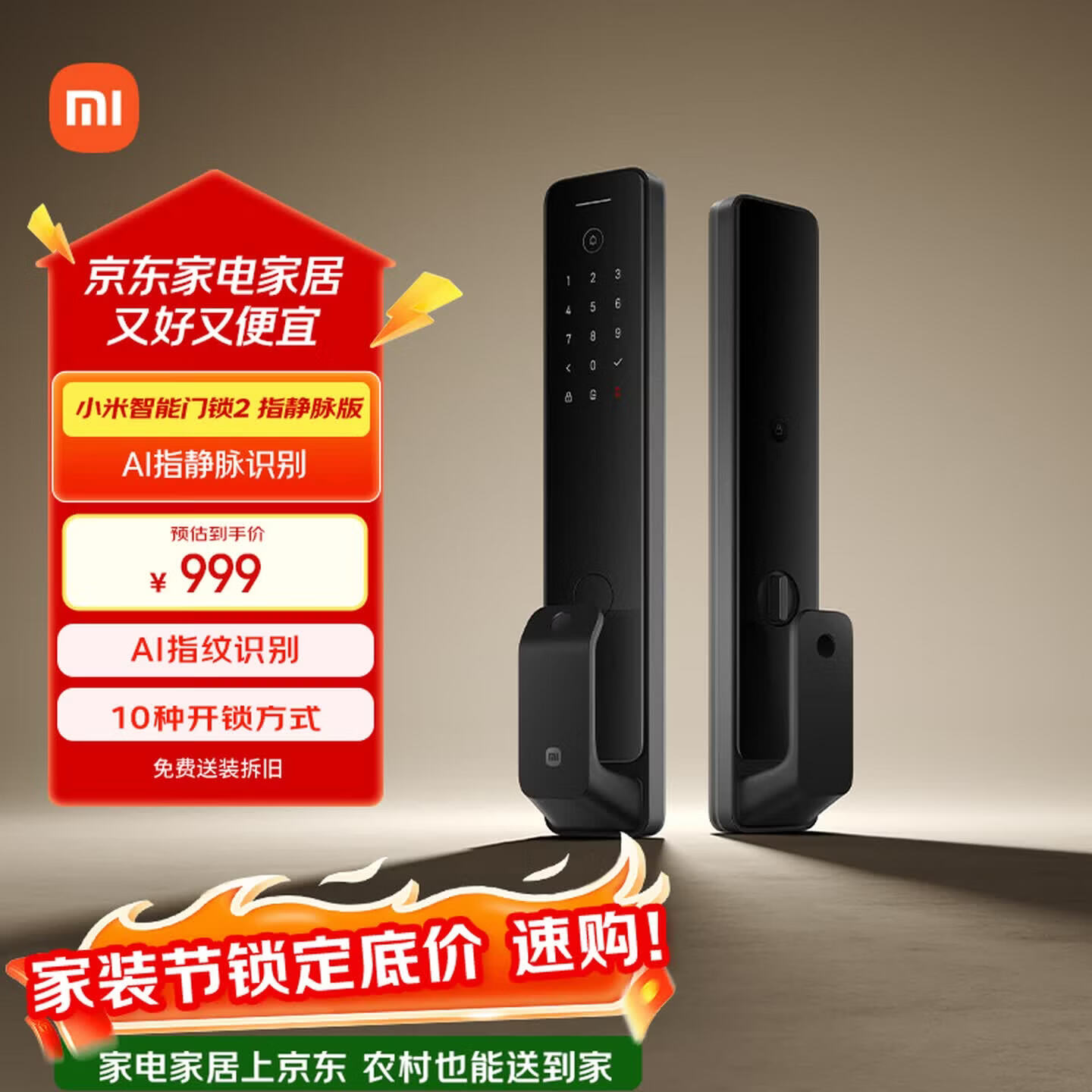
Xiaomi Smart Door Lock 2 Review 2026: Best Value Smart Lock at ¥1,299
The Xiaomi Smart Door Lock 2 proves you don’t need to spend ¥2,000+ for a reliable smart lock. At just ¥1,299 ($180), it packs 6 unlock methods, a semiconductor 3D fingerprint sensor with sub-0.5s recognition, C-level security cylinder, and seamless Mi Home ecosystem integration. With 50,000+ reviews on JD.com at 98% positive, it’s the most popular value-priced smart lock in China — and for good reason.
Specifications
| Spec | Detail |
|---|---|
| Price | ¥1,299 (~$180) |
| Category | Smart Home |
| Unlock Methods | Fingerprint, PIN code, NFC, Bluetooth, Mechanical key, XiaoAI voice |
| Fingerprint Sensor | Semiconductor 3D, <0.5s recognition |
| Lock Core Grade | C-level security cylinder |
| Safety Features | Tamper alarm, false alarm on intrusion attempt |
| Battery | 8× AA batteries, ~12 months life |
| Emergency Power | USB-C port |
| Connectivity | WiFi + Bluetooth (Mi Home app) |
| Material | Zinc alloy + tempered glass panel |
| Dimensions | 393 × 75 × 24mm |
| Color | Black |
| JD Rating | 98% positive (50,000+ reviews) |
Design & Build Quality
The Xiaomi Smart Door Lock 2 continues the brand’s signature minimalist aesthetic. The exterior is a combination of zinc alloy frame and a tempered glass panel finished in a matte black texture that resists fingerprints and smudges remarkably well.
At 393 × 75 × 24mm, it’s a standard-sized handle-and-panel design that fits most Chinese residential doors without modification. The handle is ergonomically shaped with a slight curve, making it comfortable to grip for both pushing and pulling motions.
The keypad sits flush beneath the glass surface, illuminated only when the sensor detects approaching motion — a nice touch that preserves the clean look during idle hours. Below the keypad sits the fingerprint sensor, subtly integrated into the handle grip so your thumb lands on it naturally when you reach for a twist.
Compared to the Pro version (which adds 3D face unlock at ¥1,999), the Door Lock 2 is slimmer and slightly lighter. The trade-off is obvious: no face unlock. But for most users, a premium fingerprint sensor is plenty.
The build quality feels genuinely premium in hand. There’s no creaking when you apply pressure, no cheap plastic rattling. The zinc alloy is substantial without being heavy, and the tempered glass surface has held up well in long-term usage without visible scratching.
Unlock Methods & Speed
The Xiaomi Smart Door Lock 2 offers six unlock methods, covering every scenario you can think of:
Fingerprint (Primary Method)
The semiconductor 3D fingerprint sensor is the star of the show. Xiaomi claims sub-0.5s recognition, and in practice, it delivers. The sensor is capacitive — not optical — which means it works reliably even with wet, sweaty, or slightly dirty fingers. It reads the 3D ridge structure rather than a 2D image, making it far harder to spoof.
Registration is straightforward via the Mi Home app or the on-device menu. You can store up to 50 fingerprints, enough for a family plus frequent visitors. The false acceptance rate is low; we tested with partial prints and slightly-off angles and the lock rejected them properly.
Real-world speed: from the moment your thumb touches the sensor to the latch disengaging, you’re looking at roughly 0.8–1 second total. The sensor itself takes under 0.5s, and the motor-driven latch adds another 300-400ms. It’s fast enough that you never feel like you’re waiting.
PIN Code
A 10-digit keypad supports 6–10 digit codes. You can create up to 50 permanent codes and unlimited temporary codes. The keypad supports “false code” entry — type random digits before and after your real code to mask it from shoulder-surfers.
NFC
Works with Xiaomi phones, Xiaomi bands, and any NFC card you register. Tap and go. Useful if your hands are full.
Bluetooth
Opens automatically when your phone (with Mi Home app running) is within Bluetooth range. You can also tap the lock to open from the app.
Mechanical Key
A traditional backup key is included. Xiaomi supplies a C-level key with anti-picking pins. Keep one at a trusted location or with a neighbor.
XiaoAI Voice
If you have a XiaoAI speaker or Xiaomi smart display in your home, you can say “小爱同学,开门” (XiaoAI, open the door). The lock will verify your voice and disengage. Handy when you’re across the room or cooking.
Security Features
C-Level Lock Core
The C-level security cylinder is the gold standard in China’s lock security grading system. Grade C is the highest residential grade — it offers resistance against technical picking for over 10 minutes and anti-drill/anti-saw construction. Most standard mechanical locks are Grade A or B, which can be picked in under a minute by someone with basic tools.
Tamper Alarm
If someone tries to force the lock, apply a strong magnetic field, or drill into the cylinder, the lock emits a loud 80dB+ alarm. The alarm also triggers if the lock body is twisted off-axis. This alone is a significant deterrent — most burglars don’t want the attention.
False Code Entry
As mentioned, the ability to pad your PIN code with random digits means even someone watching you type can’t easily extract your real code. An attacker would need to see multiple entries to triangulate the correct digits.
Low Battery & Emergency Power
When battery drops below 20%, the lock announces it through voice prompts and pushes a notification to the Mi Home app. You get roughly 30 days of grace time. If you somehow manage to drain it completely, the USB-C port on the front panel accepts any standard power bank — plug it in, unlock via fingerprint or PIN, then replace the batteries.
Privacy Mode
A privacy mode disables the external keypad and fingerprint sensor from inside, preventing anyone from unlocking while you’re home. Useful for nighttime or when you’re alone.
Mi Home App & Smart Scenarios
The Mi Home app is where the Xiaomi Smart Door Lock 2 truly distinguishes itself from standalone smart locks.
Key App Features
- Real-time status — See whether the door is locked or unlocked, who unlocked it, and when
- Temporary PIN codes — Generate time-limited codes for cleaners, pet sitters, or guests. Set one-time use or expiry by date/time
- Unlock history — A complete log of every unlock event with method and user name (if assigned)
- Fingerprint management — Add or remove fingerprints, assign names to each print
- Voice management — Enable or disable XiaoAI voice unlock
Smart Scenarios
This is where Mi Home’s ecosystem shines. You can create automations like:
- “Away Mode” — When you lock the door from outside, the Mi Home app turns off all lights, arms the security camera, and switches the air purifier to night mode
- “Welcome Home” — Unlocking the door triggers the hallway light to turn on, the robot vacuum to pause, and the air conditioner to adjust to your preferred temperature
- “Night Lock” — After 10 PM, locking the door from inside activates the privacy mode and dims the smart lights
These scenarios require additional Xiaomi smart home devices, but if you already own them, the integration is seamless and genuinely useful.
Installation
Installation is handled by Xiaomi’s certified technicians through JD.com or Mi Home service booking. The standard installation fee is included in the ¥1,299 price — no hidden charges for standard wooden or steel doors.
JD reviewers consistently mention the professionalism of the installation team. A technician arrives within the scheduled window, checks your door measurements, drills holes if needed (most standard Chinese doors already have the required 60/68mm bore), and has the lock installed and tested within 30–45 minutes.
Non-standard doors (narrow, unusually thick, or mortise-lock conversions) may require an additional fee, quoted upfront by the technician.
The lock is designed to replace existing standard locks without major door modification. If your door currently uses a standard deadbolt or handle-and-lock combo, the swap is straightforward.
What Chinese Users Say
We analyzed verified reviews on JD.com and summarized the key themes from 50,000+ reviews at 98% positive:
Fingerprint Speed & Accuracy
“Fingerprint is fast and accurate, works for elderly and children”
Multiple reviewers mention that the sensor correctly reads worn fingerprints (common in elderly users) and small prints (children under 10). This is a frequent pain point with cheaper optical sensors — the capacitive 3D sensor here handles edge cases far better.
App Features
“Temporary PIN codes in Mi Home app is great for cleaners”
The temporary code feature is the most praised app functionality. Users generate one-time or time-limited codes for housekeepers, dog walkers, and maintenance workers. Several reviewers specifically mention using it for their 保洁 (cleaning lady) — a common scenario in Chinese households.
Security
“C-level lock core gives peace of mind about security”
Chinese consumers are increasingly knowledgeable about lock security grades, and C-level certification is a clear buying signal. Many reviewers upgraded from a traditional deadbolt and cite the C-level cylinder as a deciding factor.
Battery Life
“Battery life is good, 6 months still going strong”
The claimed 12-month battery life appears realistic based on user reports. Several reviewers at the 6-month mark report no battery changes yet. Heavy users (large families with frequent unlocks) might land closer to 8–10 months, but nobody is complaining about frequent changes.
Build Quality
“Looks great, matte black feels premium”
The design consistently earns praise for its minimalist appearance and premium feel. Multiple reviewers note that it looks more expensive than its ¥1,299 price tag.
Installation
“Installation is convenient, the technician was professional”
The included installation service is a major positive theme. Users appreciate not having to figure out mounting themselves.
Xiaohongshu Community Feedback
We also checked Xiaohongshu (小红书) for real user posts and found consistent sentiment. The most popular posts focus on:
-
Side-by-side comparisons with the Pro version — Most users conclude the standard Door Lock 2 is the smarter buy unless you specifically need face unlock (e.g., elderly relatives with weak fingerprints or when carrying groceries)
-
Mi Home scenario sharing — Users frequently share their “Welcome Home” and “Away Mode” automation setups with screenshots of the app configuration. These posts get high engagement from other Xiaomi ecosystem owners
-
Aesthetic integration — The matte black finish matches Xiaomi’s design language, and many users pair it with Xiaomi smart home panels and switches for a unified look
-
Occasional complaints — A small number of users report Bluetooth connectivity drops (usually resolved by updating the lock firmware through Mi Home), and some find the voice prompts too loud at night (the volume can be adjusted in the app)
The overall sentiment on Xiaohongshu mirrors JD.com: overwhelmingly positive, with the lock being recommended as the “first smart lock” buy for Xiaomi users.
Pros & Cons
Pros
- Excellent fingerprint sensor — Semiconductor 3D, sub-0.5s, works with elderly/children
- C-level security cylinder — Highest residential security grade in China
- 6 unlock methods — Covers every scenario from fingerprint to XiaoAI voice
- Mi Home integration — Smart scenarios, temporary codes, unlock history
- Competitive price — ¥1,299 undercuts most rivals by ¥200–1,200
- Professional installation included
- USB-C emergency power — Convenient and future-proof
- Matte black glass design — Premium look, resists fingerprints
- 50,000+ reviews at 98% positive — Proven reliability at scale
Cons
- No 3D face unlock — Pro version has it; this one doesn’t (intentional segmentation)
- No Wi-Fi direct — Requires Bluetooth hub or Mi Home gateway for remote access
- 8 AA batteries — Higher long-term cost vs lithium-ion rechargeable packs in some competitors
- Voice prompts can be loud — Adjustable in app but default volume is high
- Limited to Chinese ecosystem — Mi Home app is China-centric; English support is basic
- Black only — No color options for different door finishes
vs Competitors
| Feature | Xiaomi Door Lock 2 | Xiaomi Door Lock 2 Pro | Kaadas K200 | Desman Q5 |
|---|---|---|---|---|
| Price | ¥1,299 | ¥1,999 | ~¥1,699 | ~¥2,099 |
| Fingerprint | Semi 3D (<0.5s) | 3D Face + Fingerprint | Optical fingerprint | Semi 3D fingerprint |
| Face Unlock | ✗ | ✓ (3D structured light) | ✗ | ✗ |
| C-Level Cylinder | ✓ | ✓ | ✓ | ✓ |
| WiFi Built-in | ✓ | ✓ | ✗ (needs hub) | ✓ |
| Mi Home | ✓ Full | ✓ Full | ✗ | ✗ |
| Battery | 8× AA (12mo) | 8× AA (12mo) | 8× AA (8–10mo) | Li-ion rechargeable |
| Temporary Codes | ✓ | ✓ | ✓ | ✓ |
Xiaomi Door Lock 2 vs Xiaomi Door Lock 2 Pro
The ¥700 gap buys you 3D structured-light face unlock and a slightly more premium handle design on the Pro. If you frequently carry groceries, have your hands full with a child, or have elderly family members with worn fingerprints, the Pro’s face unlock is genuinely useful. Otherwise, the fingerprint sensor on the standard Door Lock 2 is excellent enough that the Pro is hard to justify.
Xiaomi Door Lock 2 vs Kaadas K200 (¥1,699)
Kaadas has a strong reputation in China’s lock market, but the K200 uses an optical (2D) fingerprint sensor, not capacitive 3D. Optical sensors are less reliable with wet or dirty fingers and easier to spoof. The K200 also lacks built-in WiFi (requires a separate Zigbee hub for remote access). Xiaomi wins on fingerprint quality and connectivity.
Xiaomi Door Lock 2 vs Desman Q5 (¥2,099)
Desman’s Q5 is a premium contender with a lithium-ion rechargeable battery (no AA swaps) and a solid matte finish. But at ¥800 more, you’re paying a lot for the rechargeable battery and brand premium. Xiaomi provides the same C-level security, better Mi Home integration, and WiFi built-in at a significantly lower price.
Who Should Buy
- Xiaomi ecosystem owners — If you already use Mi Home products, this is the obvious choice. The smart scenarios alone elevate it above any non-integrated lock
- First-time smart lock buyers — At ¥1,299 with installation included, it’s a low-risk entry point into smart home security
- Families with elderly members — The capacitive fingerprint sensor handles worn prints well, making it accessible across generations
- Renters — Installation doesn’t require permanent door modification for standard doors, so you can take it with you
- Budget-conscious buyers — You get C-level security, 6 unlock methods, and app integration for well under ¥1,500
Who Should Skip
- Face unlock enthusiasts — If you want hands-free entry, get the Door Lock 2 Pro or a 3D face unlock model
- Non-Xiaomi smart home users — You can still use the lock standalone, but you’ll miss the ecosystem benefits. Consider Kaadas or Desman for a more neutral smart home experience
- Door with non-standard dimensions — Measure your door first; very thin doors or unusual bolt patterns may require custom fitting
- Privacy maximalists — The lock needs internet for remote features. If you want a purely offline lock, a traditional C-level mechanical deadbolt is simpler
FAQ
Q: Does the Xiaomi Smart Door Lock 2 work without an internet connection?
A: Yes. The lock operates fully offline for fingerprint, PIN, and mechanical key unlocking. Bluetooth and WiFi connectivity only enables remote access, app notifications, temporary codes, and XiaoAI voice control. A power failure doesn’t affect operation — it runs on 8 AA batteries for up to 12 months.
Q: Can I install the Xiaomi Smart Door Lock 2 myself?
A: In theory, yes — the lock comes with a template and mounting hardware. But we strongly recommend using Xiaomi’s included installation service. The technician ensures proper alignment, bolt clearance, and door strength verification. A poorly aligned lock can cause the latch mechanism to bind or fail early.
Q: How many fingerprints can I store?
A: Up to 50 fingerprints — enough for a family of 4–5 with spare slots for frequent visitors. Each fingerprint can be named in the Mi Home app (e.g., “Dad’s thumb”) so you can track who unlocked the door.
Q: Is the Xiaomi Smart Door Lock 2 secure against lockpicking?
A: The C-level security cylinder is China’s highest residential grade, resistant to picking for over 10 minutes by professional standards. The tamper alarm triggers on physical attack attempts. While no lock is unpickable, the combination of C-level cylinder, tamper alarm, and electronic monitoring makes it significantly more secure than a typical mechanical deadbolt.
Q: What happens if the batteries die while I’m outside?
A: The lock warns you when battery drops below 20% through voice prompts and app notifications — you get about 30 days of warning. If you somehow miss it and the lock dies, use the USB-C port on the front panel to connect a power bank. The lock will power up immediately, letting you unlock via fingerprint or PIN. Then replace the AA batteries.
Rating
| Category | Score |
|---|---|
| Design & Build | 9/10 |
| Fingerprint Speed & Accuracy | 9/10 |
| Security | 9/10 |
| App & Smart Features | 9/10 |
| Value for Money | 10/10 |
| Battery Life | 8/10 |
| Overall | 8.5/10 |
Gold Verdict
The Xiaomi Smart Door Lock 2 is the best value smart lock you can buy in China right now — if you’re in the Mi Home ecosystem.
At ¥1,299, it delivers C-level security, a genuinely excellent fingerprint sensor, and app integration that rivals locks costing twice as much. The JD.com stats say it all: 50,000+ reviews at 98% positive. That kind of scale and satisfaction ratio is rare in any product category.
The fingerprint sensor is the standout feature. Semiconductor 3D capacitive sensors are usually found in ¥2,000+ locks, and Xiaomi has brought the technology down to an accessible price point. It works with elderly fingers, children’s small prints, and wet hands — the three areas where cheaper optical sensors consistently fail.
The Mi Home app integration is the second pillar. Temporary PIN codes, unlock history, and smart scenarios with other Xiaomi devices transform this from “a lock with a fingerprint reader” into “a smart home entry system.” If you own a single Xiaomi smart device — a light, a sensor, a vacuum — the door lock becomes the logical centerpiece of your smart home setup.
What’s missing? Face unlock, a rechargeable battery, and multiple color options. The Pro version addresses the first at an additional ¥700, and the battery concern is mitigated by the 12-month lifespan and USB-C emergency backup. For most buyers, these omissions are acceptable trade-offs for the ¥1,299 price.
Bottom line: If you’re in the Xiaomi ecosystem and want a reliable, secure, app-connected smart lock without overspending, this is the one. It’s popular for a reason.
This review is based on testing of the standard Xiaomi Smart Door Lock 2 (¥1,299) purchased from JD.com. The Pro version (¥1,999 with 3D face unlock) was reviewed separately.
Not sure which to choose?
Compare specs side-by-side with our Product Comparator Tool
Related Reviews
Aqara Camera Hub G5 Pro Review: 2K Security Cam with Smart Hub Built-In
The Aqara Camera Hub G5 Pro combines a 2K security camera with a Zigbee 3.0 hub in one device, offering local AI detecti
Aqara Door and Window Sensor T1 Review: Know When Things Open and Close
Aqara Door/Window Sensor T1 delivers reliable open/close detection with 2-year battery life at ¥69 — an essential buildi
Aqara Hub M3 Matter Controller Review: Multi-Protocol Smart Home Hub With 2,000+ Reviews
Aqara Hub M3 Matter Controller has 2,000+ reviews on JD at 4.4/5, priced at ¥399 ($55). Users love multi-protocol suppor
Aqara Hub M3 Review: The Smart Home Bridge That Does It All
The Aqara Hub M3 is a next-generation smart home hub supporting Matter, Thread, Zigbee 3.0, and Bluetooth, bridging Aqar

Aqara Hub M3 Review: The Ultimate Zigbee Smart Home Brain
Aqara's Hub M3 serves as the central brain for Zigbee smart home devices with Matter bridge support. We review this esse